
Reverse Engineer Anything (REA) on GitHub: How Far It Goes
How far can REA, Reverse Engineer Anything, really go? A target-by-target map from Electron apps to stripped binaries to VM-protected code, and why.
Reverse Engineer Anything (REA) is a free, MIT-licensed toolkit that lets an AI coding agent study software it has no source code for. Launched on GitHub as morluto/rea on April 14, 2026, REA works as one MCP server plus a command line: the agent asks a question, REA runs analysis tools such as Ghidra, IDA, Hopper or JADX on your own machine, and the agent gets back findings, the evidence behind them and the parts that stayed unknown. On October 29, 2026, the project README listed 36 kinds of target, from websites and Electron apps to firmware and Unity IL2CPP metadata.
This piece comes from Devirt (devirt.re), a team that recovers code hidden by virtual-machine protectors, so we spend our days at the far end of the scale described below. The short version: how far REA gets depends less on REA than on what the build left inside the file. What follows is a map of eight kinds of target, ordered from the ones that give up their logic almost for free to the one no decompiler can read.
Our explainer video shows what that far end looks like and how the code gets recovered:
REA on GitHub at a glance
The official REA repository is github.com/morluto/rea, and its README names exactly three trusted places to get the tool: the repository itself, rea.tools and the npm package rea-agents.
| Fact | Detail (checked October 29, 2026) |
|---|---|
| Repository | github.com/morluto/rea |
| Created | April 14, 2026 |
| License | MIT, for REA's own code |
| Package and setup | rea-agents on npm, started with npx rea-agents setup |
| Latest release | rea-agents 6.8.0, published October 25, 2026 |
| Stars and forks | 403,971 stars, 101,250 forks |
| Native engines | Ghidra, IDA, Hopper or Kuna, from your own install |
| Agents | Claude Code, Cursor, Codex, Grok Build, Gemini CLI and other local MCP clients |
REA reaches an agent through MCP, the Model Context Protocol, which is why one setup command covers so many different agents. Popularity also brought copycats. The README states plainly that a lookalike repo name or a pasted copy of its text proves nothing about where a download came from, so anything outside those three sources deserves suspicion.
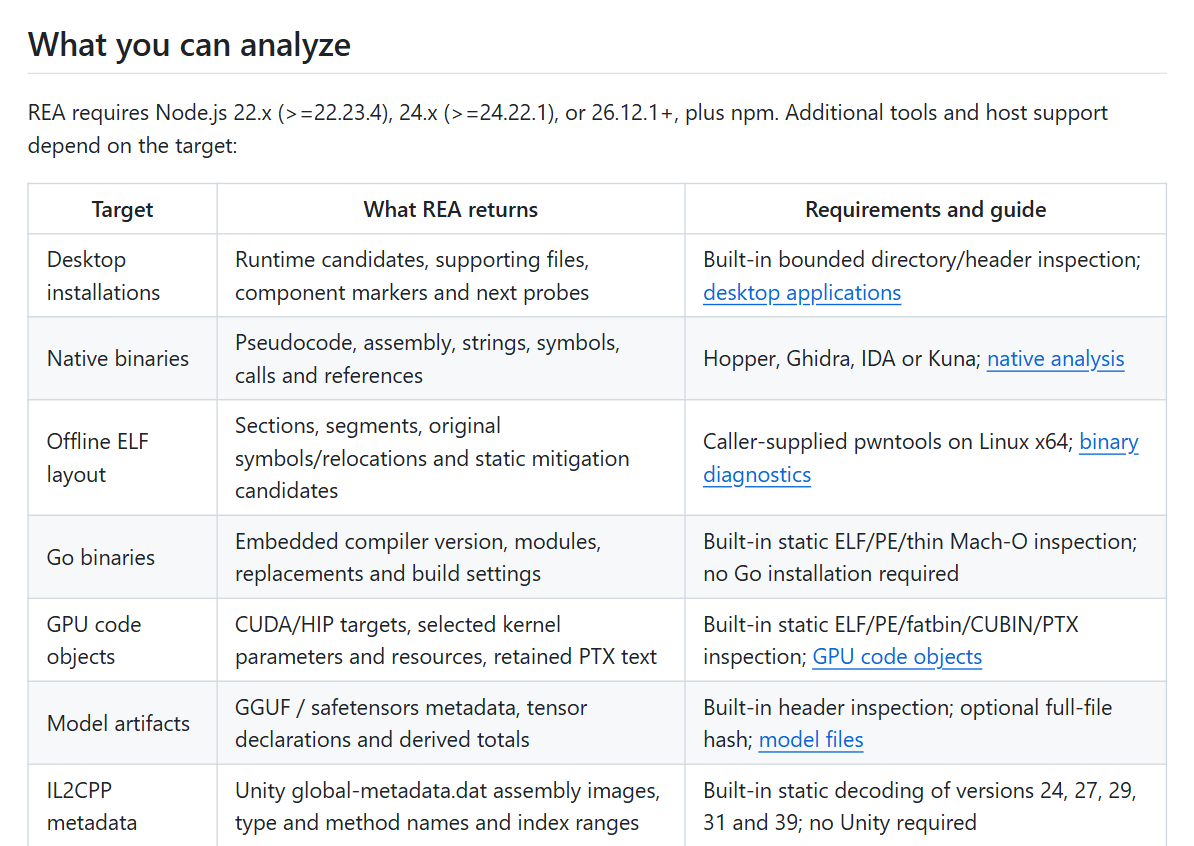 The target table in REA's README, captured October 29, 2026.
How hard is it to reverse engineer something?
How hard reverse engineering is depends on how much of the original program survived the trip from source code to the file in front of you. A JavaScript or Electron app usually ships code close to its source, so modules, routes and many names read almost directly. A stripped C or C++ executable keeps only machine instructions, so every name and type has to be inferred from behavior. A function protected by code virtualization keeps neither: its instructions were swapped for bytecode that only a virtual machine built into that same file understands.
REA's README follows the same gradient. Static JavaScript and .NET inspection run without any native engine, while native code needs Ghidra, IDA, Hopper or Kuna before REA can return pseudocode. Skill still matters, but the file sets the ceiling. An agent can't recover a name the build deleted; it can only guess at one from how the code behaves.
The difficulty map, from easiest target to hardest
The difficulty map below sorts eight common kinds of target by what survives the build. Rows 1 to 6 come from REA's own target list. Rows 7 and 8 are not REA targets at all, so for those the table describes what Ghidra, IDA and Hopper show when handed such a file.
| Target | What survives the build | What you get | How to recognize it | Difficulty |
|---|---|---|---|---|
| 1. Websites, JavaScript and Electron apps | Source-like code, often minified, with its module and route structure | REA maps modules, imports, source maps, routes and Electron IPC | An app.asar file in the app's resources folder |
Low |
| 2. .NET assemblies | Type and method names, metadata and CIL instructions | REA reads metadata and CIL statically, no native engine needed | A .exe or .dll that runs on the .NET runtime | Low |
| 3. Android APKs | Classes and methods as bytecode, plus the manifest | JADX decompiles the methods; the build's shrinker may have shortened names | An .apk file | Low to medium |
| 4. PyInstaller executables | Python bytecode bundled inside a native wrapper | REA lists the bundle and extracts entry scripts and bytecode | One .exe that carries its own Python runtime | Low to medium |
| 5. Go and Rust binaries | Native code plus embedded build metadata: compiler version and modules, or Rust crates when the build recorded them | REA reads that metadata with built-in inspection; the code itself needs a native engine | Go version strings or Rust crate paths among the file's strings | Medium |
| 6. Stripped native C or C++ | Machine instructions, strings and imports, but no names or types | Ghidra, IDA, Hopper or Kuna produce pseudocode with generated names | Function names like FUN_00401000 or sub_401000 in the decompiler |
Medium to high |
| 7. Packed or encrypted executables | A small unpacking stub and compressed data; the real code appears only in memory at run time | The decompiler shows the stub, and most of the file looks like noise | High-entropy sections and very few imports | High |
| 8. Virtualized functions (VMProtect, Themida, Code Virtualizer) | The protector's interpreter and bytecode, not the original instructions | The decompiler shows a dispatch loop, many small handlers and tables of bytecode | Protector section names such as .vmp0, or a flag from a protection check |
Highest |
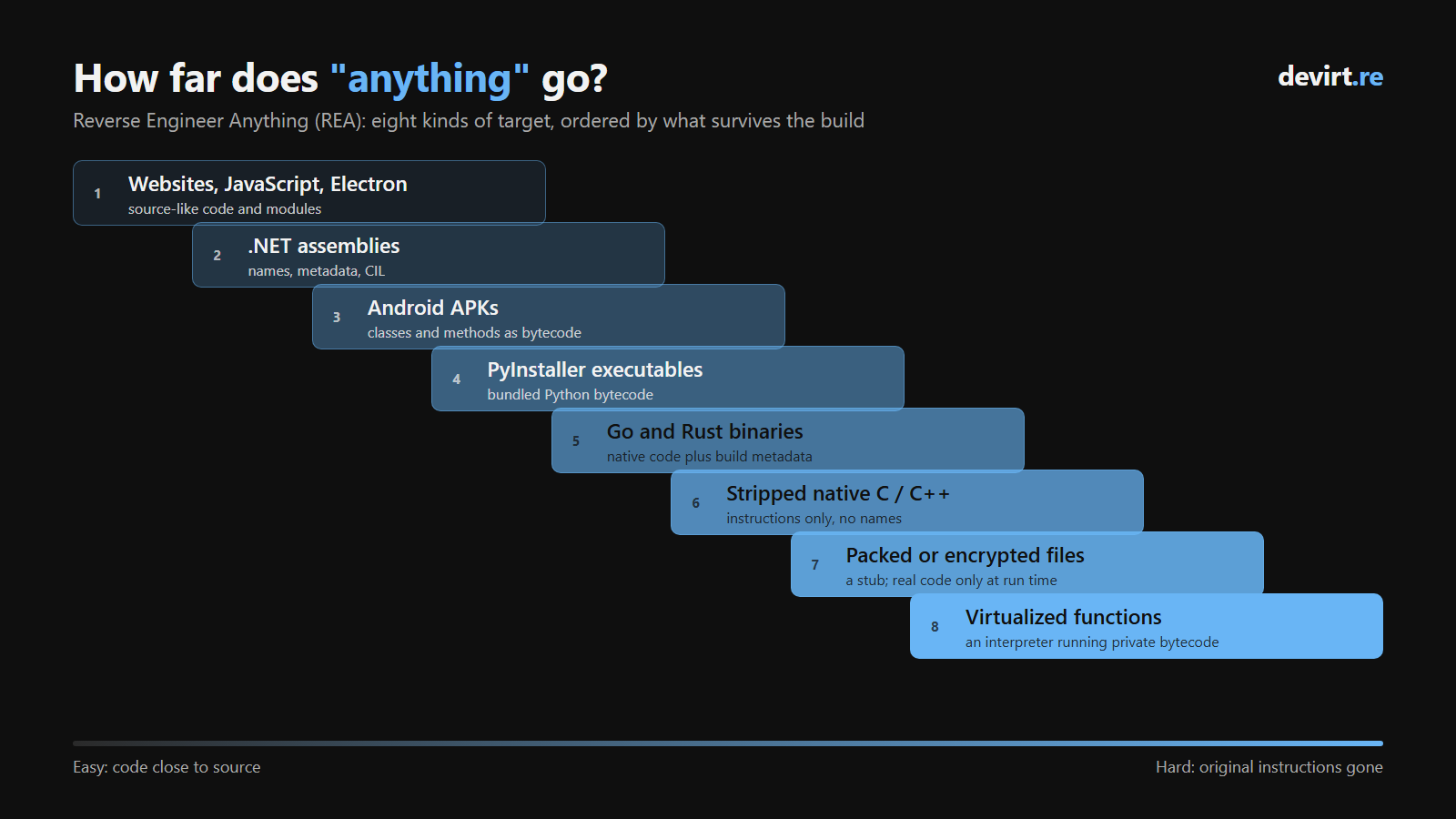 Each step down the ladder removes more of the original program before anyone opens the file.
Games built with Unity's IL2CPP are a split case. REA decodes the game's global-metadata.dat for type and method names, while the game logic itself is native code that lands in row 6.
Why some builds give up their logic and others don't
Every build step between source code and a shipped file can delete information, and each step deletes a different kind. Reading the difficulty map row by row is really counting those losses:
- Names. Compilers turn named functions and variables into addresses, and stripping the symbol table removes the last record of them. JavaScript, .NET and Python bytecode keep most names, which is why rows 1 to 4 read so easily.
- Types and shape. Optimizing compilers inline small functions, reorder blocks and discard type information. The decompiled logic stays correct but looks little like what the programmer wrote.
- Code on disk. A packer compresses or encrypts the program and restores it only in memory, so any static view sees the wrapper instead of the program.
- The instruction set. A virtualizing protector replaces the processor's instructions with bytecode for an instruction set it makes up, which removes the one thing every earlier row still had.
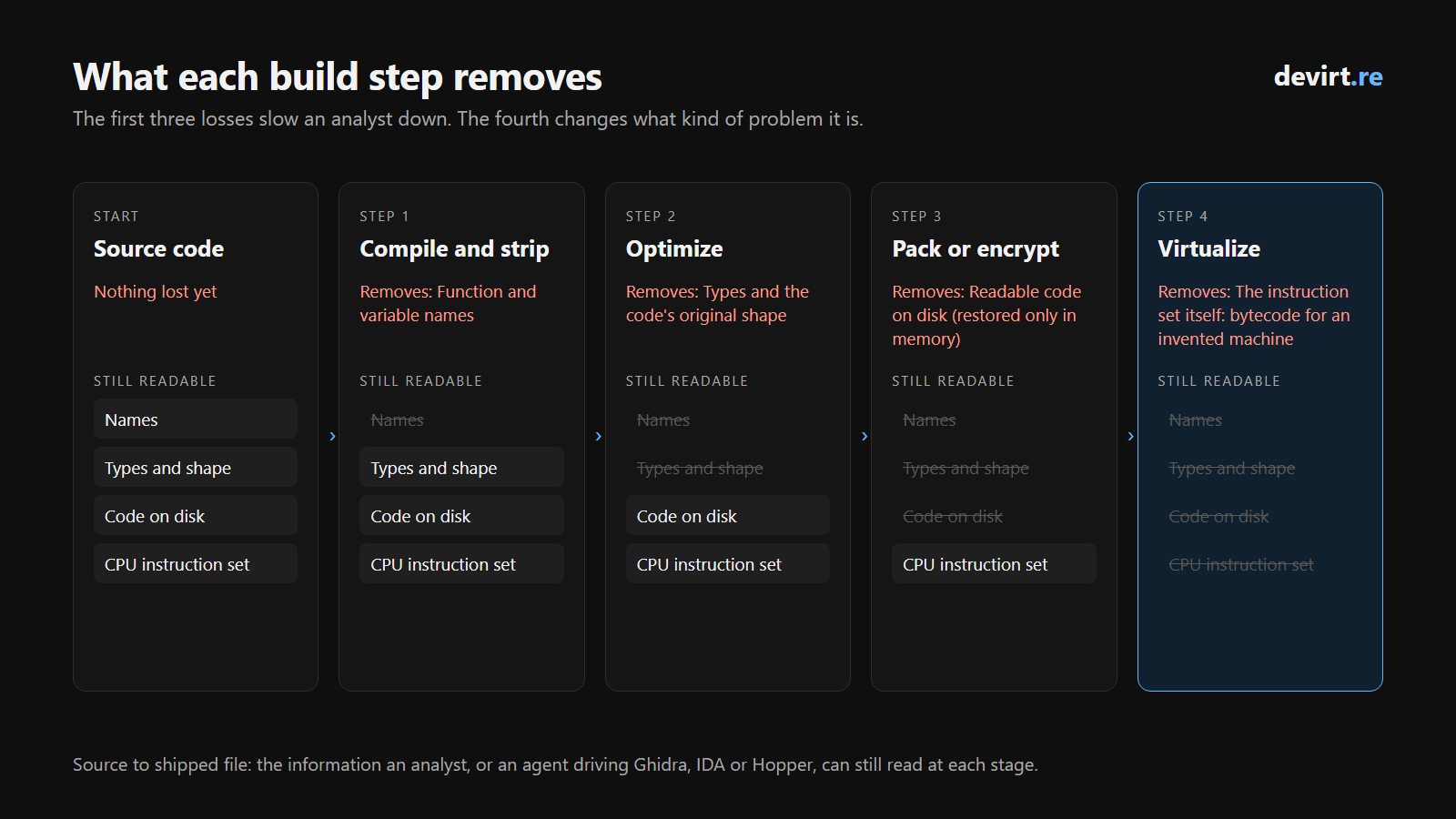 The first three losses slow an analyst down. The fourth changes what kind of problem it is.
The last row: functions rebuilt as a private virtual machine
Code virtualization stops decompilers because it removes the last thing an ordinary build leaves intact: the processor's own instruction set. Stripping symbols deletes names and optimization blurs shape, yet the remaining x86 or ARM instructions still mean exactly what the CPU says they mean. A virtualizing protector such as VMProtect, Themida or Code Virtualizer rewrites selected functions as bytecode for an instruction set it invents for that build, then ships an interpreter to run it. Ghidra, IDA and Hopper decompile that interpreter faithfully, so an agent driving them through REA receives an accurate description of the interpreter and nothing about the function it hides.
Recovering the hidden function is a separate job called devirtualization. It means rebuilding the invented instruction set from how the interpreter behaves, then translating the bytecode back into native-shaped functions that a decompiler can read normally. This is the work Devirt does. Recovery is automated for recognized builds of VMProtect, Themida and Code Virtualizer, along with Enigma Protector and Obsidium profiles; other virtual machines, custom ones included, start with a free assessment of the file. Each recovered function comes back labeled in Devirt's coverage ledger as proven, runtime-dependent, unresolved or permanently bounded, so a reader, human or agent, knows which results to rely on. Delivery formats include an IDA database, which opens in IDA as usual, and structured JSON that an agent can parse without a decompiler.
Devirt takes on only software that the customer owns or has authorization to analyze, such as malware under investigation, products under security review and the customer's own builds.
Which apps should you point REA at?
Point REA only at software you have the right to analyze: your own programs, malware you are investigating, targets inside an authorized security engagement, and software whose license or local law permits reverse engineering for your purpose. REA's MIT license covers REA's code and never the target. The project's DISCLAIMER lists the uses it supports, including security research, malware and incident analysis, vulnerability research with coordinated disclosure, CTFs, interoperability and software preservation. It also refuses help with circumventing DRM, license checks, anti-cheat systems or other technical protection measures.
Two practical limits follow from the same document. IDA, Hopper and JEB each require a license you obtain yourself, since REA supplies no keys. And permission to read a file is not automatically permission to run it, capture its network traffic or touch a device it controls.
Three questions readers ask
Which apps can't REA read?
No app is unreadable in principle, but REA can't read three kinds of logic on its own: code that runs on a server and never reaches your machine, code stored packed or encrypted on disk, which a static view shows only as a stub and compressed data, and functions that a protector such as VMProtect, Themida or Code Virtualizer has rebuilt as bytecode for a private virtual machine. None of the 36 target types in REA's README on October 29, 2026, names a protector, an obfuscator or a virtualizer.
Will a stronger AI model get past virtualization?
Not on its own. A stronger model reads decompiler output more cleverly, but on a virtualized function that output describes the protector's interpreter, so the model is reasoning carefully about the wrong program. The gap is missing information rather than missing intelligence: the meaning of each invented bytecode operation has to be reconstructed first, and that reconstruction is what devirtualization produces.
Can REA tell me whether a file is protected?
REA reports a file's structure, such as PE imports, ELF notes and signing certificates, but its README doesn't list detection of named protectors. For a quick first look, the free check on devirt.re reads a bounded sample of a file inside your browser without uploading it, parses the headers and sections, measures entropy and scores public protection markers. It can tell you a file may use a given protector, and it doesn't recover any code; an assessment confirms the exact protection and what can come back.
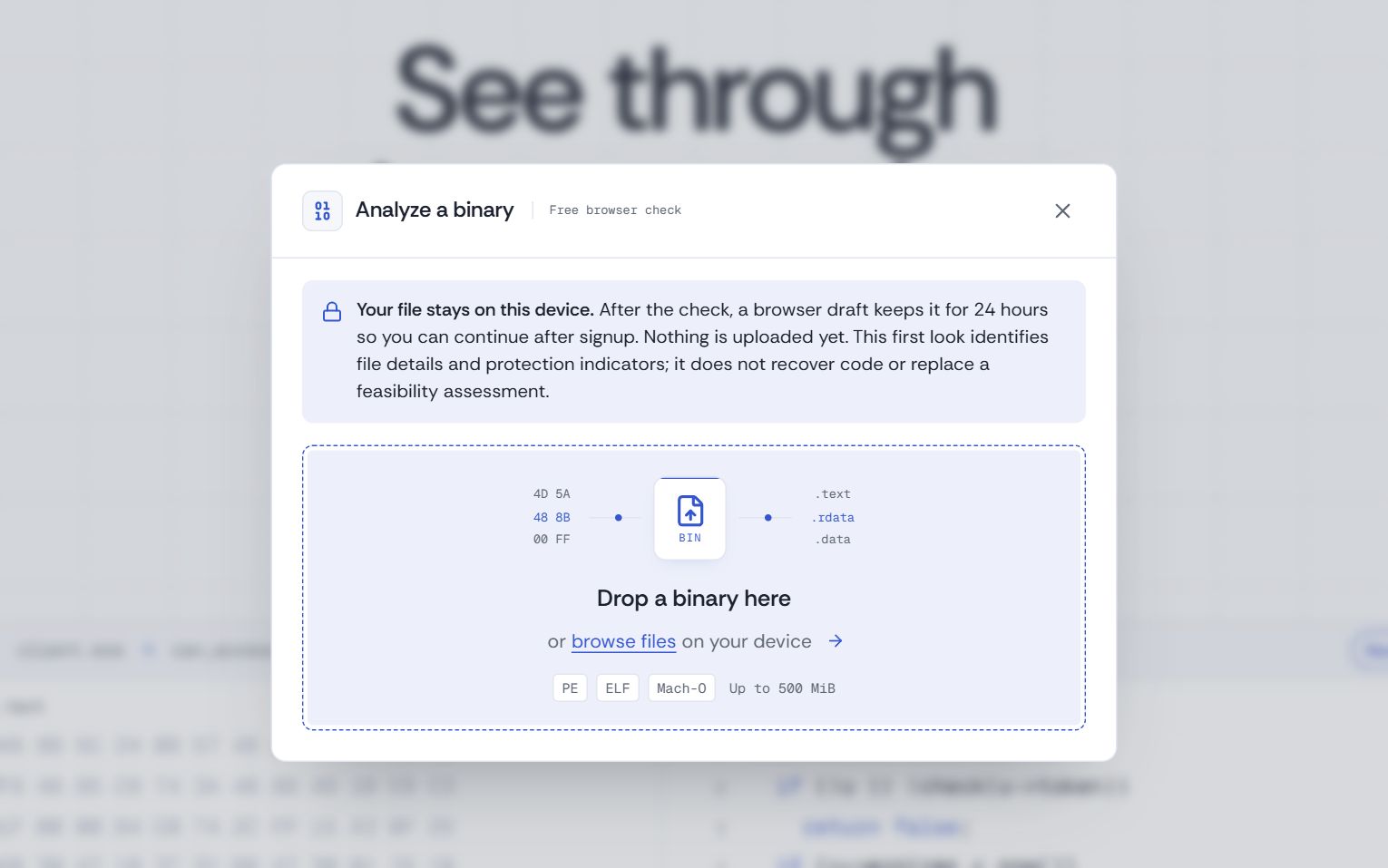 The free check on devirt.re runs on your own device and stops at identification.
If you'd rather start with the basics, our Substack overview of REA covers what the tool is in a few minutes.


