Mobile Writing Is Broken (So I Fixed It)
Writing on Android doesn't have to suck. Meet Nibit.
Howdy and welcome back. It's time for another update from Crouton Creations.
How Does Writing On Your Phone Still Suck?
As I've mentioned in previous newsletters I've been writing on my phone more and more. It's a combination of me trying to do more work when I'm out and about, touching grass, and a shift towards more and more of my work being agent assisted (especially with DevX). Between the two, I find myself writing on my phone way more than I used to.
But here's the thing - writing on my Android phone sucks. The keyboard is small, the dictation is clunky and transcripty, and the whole thing makes me want to go running back to my laptop with a full keyboard any time I need to write more than a quick response.
Nibit - Our Next Product
That's why I built Nibit, Crouton Creations' next product. Nibit is a second keyboard for Android packed with snippets, transforms, smart dictation, and a bunch more. You can just use simple triggers like ,addr and have it expand into your full text snippet. You can quickly type ,. and trigger the built-in smart dictation that uses AI assistance to clean up your ramblings, handle self correction ("Let's meet Wednesday...no, wait, Friday" => "Let's meet Friday"), and automatically remove all your fillers like um's and uh's. Insider's note: this actually uses ToneClone under the hood. It's the same backend that powers the ToneClone Ramble Mac App.
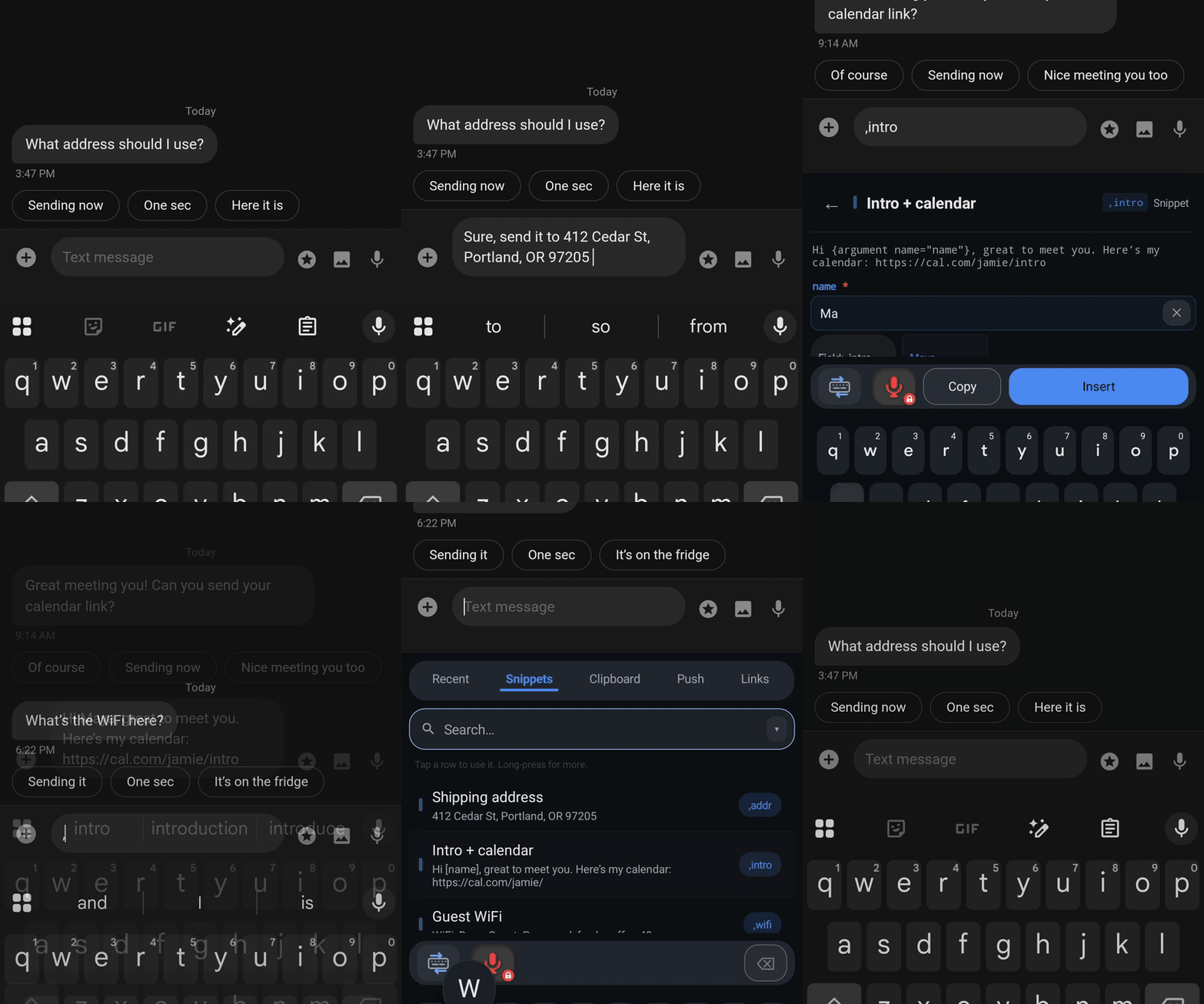
You can also push things (text, links, files, screenshots) between your phone and laptop, fully E2E encrypted, without texting yourself links. This sounds small, but has been a huge time saver in my workflow. The files have a preset TTL, auto-delete, and I have a Raycast extension to paste or push them with a keyboard shortcut. If you're also a Raycast user you can easily import your existing Snippets and Quick Links as well.
There are a bunch more features, but the punch line is a quick access way to streamline all your writing on your phone and make it faster, easier, and just a more pleasant experience. And the best part is it auto-switches back to your main keyboard (i.e. Gboard) so you don't have to give anything up to use it.
You can check out the full feature set at nibit.app or get it directly from the Play Store. And as always you're welcome to a free Cloud Pro account. Just email me your Google Play store email address and I'll hook you up.
If you do real work from your phone and have the same frustrations I did, give it a shot and tell me what you think.
What I'm checking out
A few things on my radar lately:
- Gstack - A set of prompts, agents, skills, and a few tools built by Gary Tan of Y Combinator. Particularly useful are the CEO Review, Office Hours, and the Browser daemon tool.
- RTK - rtk filters and compresses command outputs before they reach your LLM context. Single Rust binary, 100+ supported commands, <10ms overhead. Saves you lots of tokens.
- Pi Toolbox - a friend of mine's Pi Toolbox / configuration. Lots of good stuff in here, but I definitely stole some of the fork concepts, pi-native-split, and the skill for managing Pi provider configs.
Thanks for your support
All replies go straight to my inbox, so reach out if any of this was helpful or interesting. And if you know someone else who might be interested please forward this or have them sign up themselves here.
Thanks for reading!
-- Jon Fox