
Valuable Variables
In this issue:
- Variable Storage
- Creating Variables
- System.Management.Automation.PSVariable
- Annotating Variables
- Protecting Variables
- Getting My Variables
- Summary
One thing you probably use all the time in PowerShell are variables. This is a special type of object that holds a value. This value might change, although as I'll show you, it doesn't have to. I thought I'd share some details on variables that many people don't know about or don't consider.
Variable Storage
Variables are created in PowerShell and exposed through the Variable provider.
PS C:\> Get-PSProvider Variable

Name                 Capabilities                           Drives
----                 ------------                           ------
Variable             ShouldProcess                          {Variable}
I'm sure you've used Get-Variable. This command is retrieving items stored in the Variable: PSDrive.
PS C:\> Get-Variable -Name PSEdition

Name                           Value
----                           -----
PSEdition                      Core

PS C:\> Get-Item -Path Variable:\PSEdition

Name                           Value
----                           -----
PSEdition                      Core
One thing that trips up many beginners is that the variable name does not include the dollar sign ($). We only use $ when referencing the variable in a PowerShell expression.
PS C:\> If ($PSEdition -eq 'Desktop') { Write-Warning "Run this in PowerShell 7 on Windows" }
WARNING: Run this in PowerShell 7 on Windows
While you can use the PSDrive to manage variables, you should use the variable cmdlets.
PS C:\> Get-Command -Noun Variable | Select Name

Name
----
Clear-Variable
Get-Variable
New-Variable
Remove-Variable
Set-Variable
Creating Variables
I'm sure you have created many variables in your PowerShell work. It is as simple as assigning a value.
$foo = 123
You can use the variable anytime which will implicitly reference the value.
PS C:\> $foo * $foo
15129
Naming Considerations
There are very few limitations on variable names. When creating variables interactively in the console you can use anything you want, as long as you can remember what you defined. When scripting, your variables should have meaningful names. Defining $x in your PowerShell session is one thing because you can easily check the value and hopefully remember what it represents. In a script file, you may define $x in line 4 and then reference it in line 104, at which point you may have forgotten what the variable represents. In your scripts use a meaningful name like totalFileCount. This should make it easier to remember what you are working with.
There is no reason to use Hungarian notation like $strUserName or $intFileCount. The name alone should be sufficient to indicate type.
You should also avoid spaces in variable names. The syntax to work these variables is cumbersome and in fact I'm not even going to show you how. Don't do it.
I also frown on variables like $my_custom_var, except for true constants $FILE_LIST_DIRECTORY where this is the style. Instead of $my_custom_var, use casing and create an easy to type and use string like $myCustomVar. For internal variables I have been trying to not capitalize the first letter. But I will capitalize variables used in parameters, i.e. $FilePath. This helps me distinguish between parameters and code variables.
System.Management.Automation.PSVariable
Even though referencing a variable returns the value. The variable itself is its own object. Let's take a look using Get-TypeMember from the PSScriptTools module.
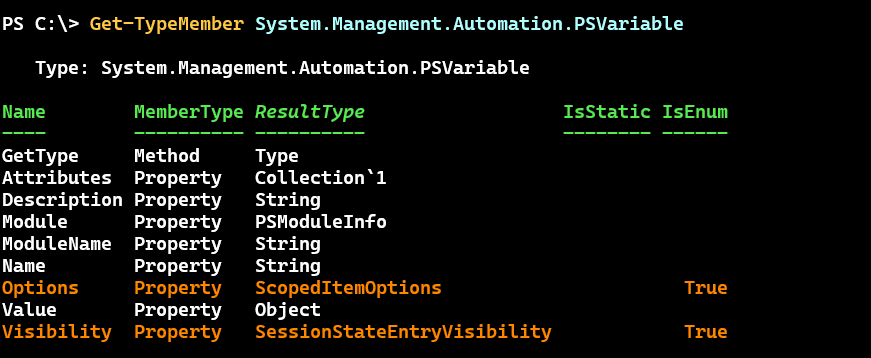
One property I want to cover in a moment is Options.
PS C:\> Get-TypeMember System.Management.Automation.ScopedItemOptions -MemberType Field | Select Name,IsStatic

Name        IsStatic
----        --------
AllScope        True
Constant        True
None            True
Private         True
ReadOnly        True
Unspecified     True


