Platyps Migration Strategies
In this issue:
- Do You Need to Migrate
- It Depends
- Back It Up
- Migrating from Markdown
- Automated Document Updates
- Generating New External Help
- Summary
The last few weeks we've been exploring how to use the new Platyps module from Microsoft. The Microsoft.PowerShell.Platyps module is a major re-write and update to the now legacy Platyps module. The old module still works and I expect to continue using it for some time. However, as I write new modules I'll use the newer Platyps module for help documentation.
I will also use the new module when updating an existing module. If I'm taking the time to make major changes to a module, I might as well update the help. I want to cover the migration process today.
Do You Need to Migrate
No.
It Depends
Ok. Maybe that was a bit too cutesy, but the fact is that you don't have to migrate. The MAML XML file that the new Platyps module generates for external module help is not much different than what he had before. Even though the new module generates new Markdown sections like Aliases, that information isn't used in PowerShell's help system. Until Microsoft revises the help system and moves away from MAML, the legacy Platyps module should suffice.
One reason you might want to migrate is to take advantage of the new object model to automate the documentation process. Or if you have other uses for the Markdown, or now Yaml files.
One major difference between Platyps versions is that the new module doesn't create or manage module about files. If your module has an existing about_<module> file you will need to manually manage it.
Back It Up
I am in the process of updating the PSIntro module so I might as well update the help files. This will be a little more challenging because this module has localized help for French and German.
The first thing I would do in any migration is backup data. I'm going to backup the main Markdown documents to a new folder in the module. However, I don't need to include it in source control since I'll eventually delete the files. I'll add an entry to the module's .gitignore file. I'm also going to ignore .bak files which are created when updating Markdown help.
docs-bak/*
docs-de-bak/*
docs-fr-bak/*
*.bak
After creating the backup folder, I'll copy the files.
PS C:\scripts\PSIntro> dir docs\*.md | copy -Destination .\docs-bak\
Migrating from Markdown
Since I already have current Markdown documents, migrating is actually very easy. And now I'm glad for the path issue because I can create new Markdown from the old files and move them to the docs folder.
PS C:\> $files = dir c:\scripts\PSIntro\docs\*-*.md | Import-MarkdownCommandHelp |
Export-MarkdownCommandHelp -OutputFolder c:\temp\ -force
PS C:\> $files | Move-Item -Destination c:\scripts\PSIntro\docs -PassThru -Force


    Directory: C:\scripts\PSIntro\docs

Mode                 LastWriteTime         Length Name
----                 -------------         ------ ----
-a---           8/18/2026 10:33 AM           3544 Add-PSIntro.md
-a---           8/18/2026 10:33 AM           6215 Export-PSIntroSettings.md
-a---           8/18/2026 10:33 AM           3207 Get-ModuleStatus.md
-a---           8/18/2026 10:33 AM           2513 Get-ProfileStatus.md
-a---           8/18/2026 10:33 AM           6965 Get-PSIntro.md
-a---           8/18/2026 10:33 AM           4094 New-PSProfile.md
-a---           8/18/2026 10:33 AM           2542 Start-PSTutorial.md
The new file captured the online link.
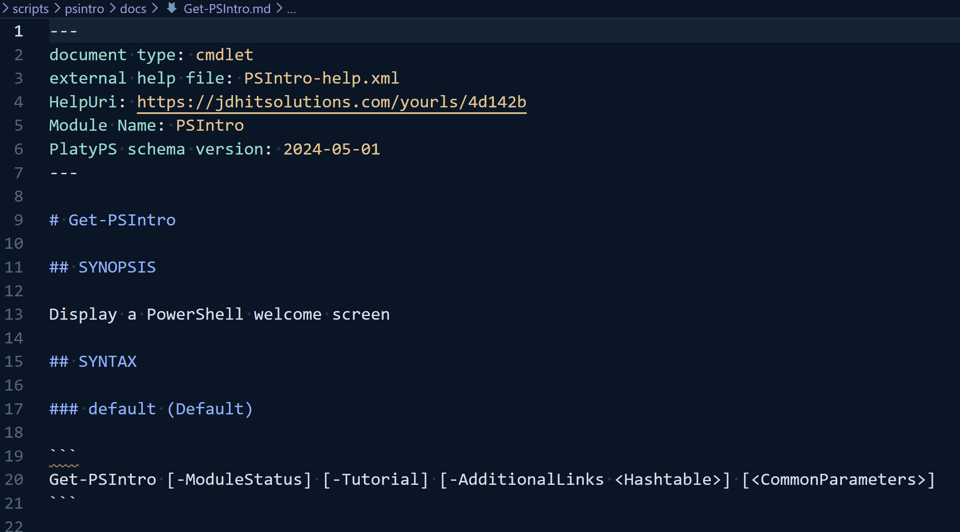
I will need to insert the yaml code fencing and update the Aliases section.