
More Prompt Power
In this issue:
- PSOh.io Meetup
- PSReadline Prompt Options
- Adding Style
- Multi-Line Prompts
- A Dynamic Git-Aware Prompt
- Summary
I hope you had an opportunity to try the prompt functions from last time. I want to continue with a few more examples, but first here's an actual news-y item for you.
PSOh.io Meetup
I will be presenting online in a few weeks for the PowerShell Ohio User Group. On 1 October at 7:00PM Eastern, I will be talking about adding value to your PowerShell functions. It isn't difficult to write a basic function in PowerShell. But I think there are PowerShell features many people overlook that add value to the function itself. These are things that can benefit the script author as well as the user.
This is a free event but you need to register. Learn more and register at https://www.meetup.com/powershellohio/events/316581155/
PSReadline Prompt Options
There is actually a little more to your prompting experience than the prompt function. I'm using this function right now.
Function prompt {
     $location = (Get-Location).Path
    #what is the maximum length of the path before you begin truncating?
    [int]$len = $Host.UI.RawUI.MaxWindowSize.width / 3
    if ($location.length -gt $len) {
        $diff = ($location.length - $len)
        #split on the path delimiter which might be different on non-Windows platforms
        $dsc = [System.IO.Path]::DirectorySeparatorChar
        #escape the separator character to treat it as a literal
        #filter out any blank entries which might happen if the path ends with the delimiter
        $split = $location -split "\$($dsc)" | Where-Object { $_ -match '\S+' }
        #reconstruct a shorted path
        if ($split.count -gt 2) {
            $here = "{0}$dsc{1}...$dsc{2}" -f $split[0], ($split[1][0..$diff] -join ''), $split[-1]
        }
        else {
            #I'm in a long top-level folder name
            $here = "{0}$dsc{1}..." -f $split[0], ($split[1][0..$diff] -join '')
        }
    }
    else {
        #length is ok so use the current location
        $here = $location
    }

    #need to treat the pointer as a string
    [string]$pointer = [char]0x25b6
    [string]$ball = [char](0x25cf)
    $nested = $($pointer * ($nestedPromptLevel + 1))
    "PS $ball $here$nested "
}
This function uses special characters and will truncate long paths.
PS ● C:\Program Files\PowerShell\7▶ cd modules
PS ● C:\Progr...\Modules▶
The prompt defines a pointer based on the number of nested levels, but this doesn't work the way you might expect. PowerShell will enter a nested prompt when it detects there is more to your command.

There is an color indication that your command is incomplete with the red angle bracket. And of course, you see the nested prompt indicated by >>. But I'm using a fancy pointer in my prompt. It would be nice to use that.
These settings are controlled by PSReadline. There are a few prompt-related options you can control.
PS ● C:\▶ Get-PSReadlineOption | Select *prompt*

ContinuationPrompt ContinuationPromptColor ExtraPromptLineCount PromptText
------------------ ----------------------- -------------------- ----------
>>                                                            0 {> }
I think the settings are self-evident. I'm going to make some adjustments.
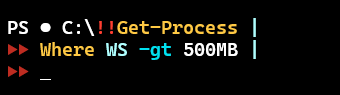
Set-PSReadlineOption -ContinuationPrompt "$([string][char]0x25b6 *2) "
Set-PSReadlineOption -PromptText "!!"
Set-PSReadlineOption -Color @{ContinuationPrompt = $PSStyle.Foreground.Red}
The change is immediate.
These are settings you would add to your PowerShell profile script if you want to make them persistent.


