
Master Your Environment Variables
In the previous email, we started looking at ways to use the [System.Environment] .NET class. Even though the ENV: PSDrive exposes some of the class's functionality, there are other features we might want to take advantage of.
Special Folders Revisited
For example, at the end of the last article I asked you to think about how you would enumerate all special folders and resolve the paths. I hope you took up this scripting challenge. Here's something I came up with.
Function Get-SpecialFolder {
    [cmdletbinding()]
    [Alias('gsf')]
    [OutputType("PSSpecialFolder")]
    Param(
        [Parameter(Position = 0,HelpMessage = 'Enter one or more of the special folder names. Leave blank to get all special folders')]
        [ValidateScript({ [enum]::GetNames([Environment+SpecialFolder]) -contains $_ },
        ErrorMessage = '{0} is an invalid special folder')]
        [string[]]$Name
    )

    #if no name is specified then get all special folders
    if (-Not $Name) {
        $Name = [enum]::GetNames([Environment+SpecialFolder])
    }
    foreach ($item in $Name) {
        $ResolvedPath = [Environment]::GetFolderPath($item)
        [PSCustomObject]@{
            PSTypeName   = 'PSSpecialFolder'
            Name         = $item
            Path         = $ResolvedPath
            Exists       = Test-Path -Path $ResolvedPath
            IsEmpty      = (Get-ChildItem -path $ResolvedPath | Select-Object -first 1) ? $false : $true
            User         = [Environment]::UserName
            Computername = [Environment]::MachineName
        }
    } #foreach item
} #end function

Register-ArgumentCompleter -CommandName Get-SpecialFolder -ParameterName Name -ScriptBlock {
    param($commandName, $parameterName, $wordToComplete, $commandAst, $fakeBoundParameter)
    ([enum]::GetNames([Environment+SpecialFolder])).Where({$_ -match $wordToComplete}) |
        ForEach-Object {
            # completion text,listItem text,result type,Tooltip
            [System.Management.Automation.CompletionResult]::new($_, $_, 'ParameterValue', $_)
        }
}
This is by no means the only way to accomplish the goal. My code uses the ternary operator to return a value indicating if the folder is empty.
(Get-ChildItem -path $ResolvedPath | Select-Object -first 1) ? $false : $true
This means the function requires PowerShell 7. The function also uses an argument completer for the Name parameter so that the user can tab-complete the special folder names.
PS C:\> Get-SpecialFolder Startup

Name         : Startup
Path         : C:\Users\Jeff\AppData\Roaming\Microsoft\Windows\Start Menu\Programs\Startup
Exists       : True
IsEmpty      : False
User         : Jeff
Computername : PROSPERO
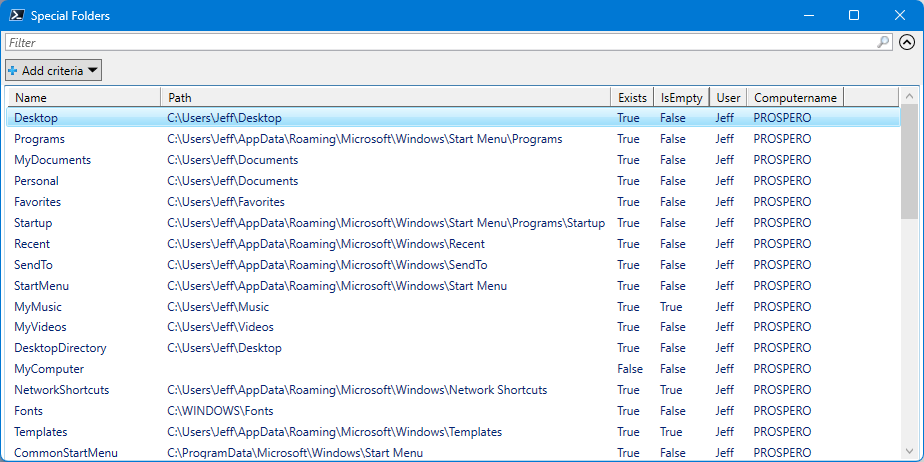
If you don't specify a special folder name, the function will return all special folders.
Get-SpecialFolder | Out-GridView -Title "Special Folders"
The [Environment] class is designed to be used locally. There is nothing in .NET that allows you to access the environment variables of a remote machine. However, as an experiment and proof-of-concept, I wanted to see what was possible.
Function Get-SpecialFolderRemote {
    [cmdletbinding()]
    [Alias('gsf')]
    [OutputType("PSSpecialFolder")]
    Param(
        [Parameter(Position = 0,HelpMessage = 'Enter one or more of the special folder names. Leave blank to get all special folders')]
        [ValidateScript({ [enum]::GetNames([Environment+SpecialFolder]) -contains $_ },
        ErrorMessage = '{0} is an invalid special folder')]
        [string[]]$Name,
        [string]$Computername = $env:COMPUTERNAME
    )

    Write-Verbose "[$((Get-Date).TimeOfDay)] Creating temporary PSSession to $Computername"
    Try {
        $ts = New-PSSession -computername $Computername -ErrorAction Stop
    }
    Catch {
        Throw $_
    }

    Write-Verbose "[$((Get-Date).TimeOfDay)] Getting who and where"
    $who = Invoke-Command {
        @{
            User= [Environment]::UserName
            Computer =[Environment]::MachineName
        }
        } -Session $ts
    #if no name is specified then get all special folders
    if (-Not $Name) {
        $Name = Invoke-Command {[enum]::GetNames([Environment+SpecialFolder])} -Session $ts
    }

    foreach ($item in $Name) {
        Write-Verbose "[$((Get-Date).TimeOfDay)] Resolving $item"
        $Resolved =  Invoke-Command {
            $out= @{}
            $out["Path"] = $rp = [Environment]::GetFolderPath($using:item)
            if ($rp) {
                $out["Test"] = Test-Path -Path $rp
            }
            $out
        } -Session $ts

        if ($Resolved.Path) {
            $exists = $Resolved.Test
             if ($Exists) {
                 Write-Verbose "[$((Get-Date).TimeOfDay)] Testing IsEmpty $($Resolved.Path)"
                 $isEmpty = (Invoke-Command {Get-ChildItem -path $rp | Select-Object -first 1} -session $ts) ? $false : $true
             }
             else {
                $Exists = $false
             }
        }
        else {
            $Exists = $false
            $IsEmpty = $true
        }
        Write-Verbose "[$((Get-Date).TimeOfDay)] Sending output"
        [PSCustomObject]@{
            PSTypeName   = 'PSSpecialFolder'
            Name         = $item
            Path         = $Resolved.Path
            Exists       = $Exists
            IsEmpty      = $IsEmpty
            User         = $who.User
            Computername = $who.Computer
        }
    } #foreach item

    if ($ts) {
        Write-Verbose "[$((Get-Date).TimeOfDay)] Removing temporary PSSession"
        Remove-PSSession $ts
    }
} #end function


