
Getting Behind PowerShell Proxy Functions
In this issue:
- What Is a Proxy Function?
- Creating a Proxy Function
- Generating the Proxy Function
- Customizing Behavior
- Alternatives
- Summary
Today I want to dive into an advanced PowerShell scripting topic that fills a niche role, and that is creating proxy functions. Proxy functions are a powerful way to wrap existing cmdlets or functions, allowing you to customize their behavior while still retaining access to the original functionality. This can be particularly useful for adding logging, error handling, or modifying parameters without changing the underlying code of the original command.
What Is a Proxy Function?
A proxy function is a customized version of a native PowerShell command. The proxy function retains the name of the original command. Due to command precedence, if you have a proxy function based on Get-Service, the proxy function name will also be Get-Service. When you execute Get-Service, PowerShell will first check for a function named Get-Service before it looks for the cmdlet. If it finds the proxy function, it will execute that instead of the original cmdlet. This allows you to modify the behavior of the command while still having access to the original functionality through the proxy.
Very often, proxy functions are used in Just Enough Administration (JEA) scenarios, where you want to restrict or modify the behavior of certain cmdlets for specific users. By creating a proxy function, you can control how a cmdlet behaves when executed by a user with limited permissions, while still allowing them to perform necessary tasks. I'm not going to cover JEA or constrained remoting endpoints, but I will show you how to create a proxy function and customize its behavior.
You may want to do this for your own purposes. Perhaps to add functionality to a native command.
Creating a Proxy Function
We will use the System.Management.Automation.ProxyCommand class to create a proxy function. Let's take a peek using Get-TypeMember:
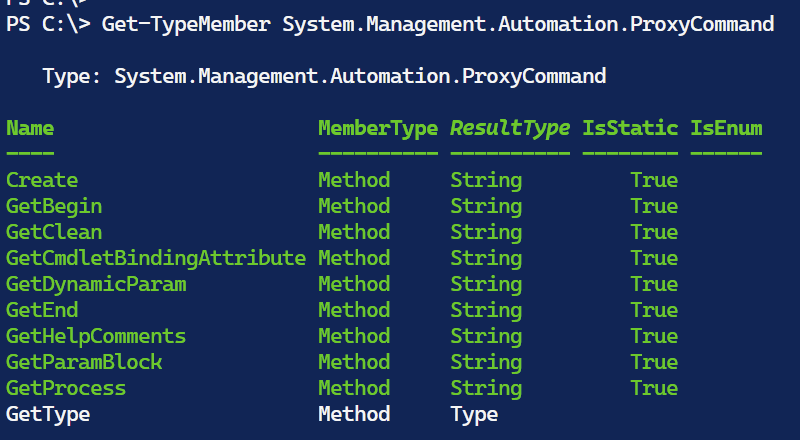
There are no properties and the methods are almost all static so there is likely not a constructor for this class.
PS C:\> Get-TypeConstructor System.Management.Automation.ProxyCommand
WARNING: No constructors found for ProxyCommand
> The Get-TypeConstructor command is also in the PSScriptTools module.
The Create() method then looks like the way to create a proxy function.
PS C:\> [System.Management.Automation.ProxyCommand]::Create.OverloadDefinitions
static string Create(System.Management.Automation.CommandMetadata commandMetadata)
static string Create(System.Management.Automation.CommandMetadata commandMetadata, string helpComment)
static string Create(System.Management.Automation.CommandMetadata commandMetadata, string helpComment, bool generateDynamicParameters)
It looks like I need a CommandMetadata object to create a proxy function. The CommandMetadata class is part of the System.Management.Automation namespace and provides metadata about a command, such as its name, parameters, and help information.
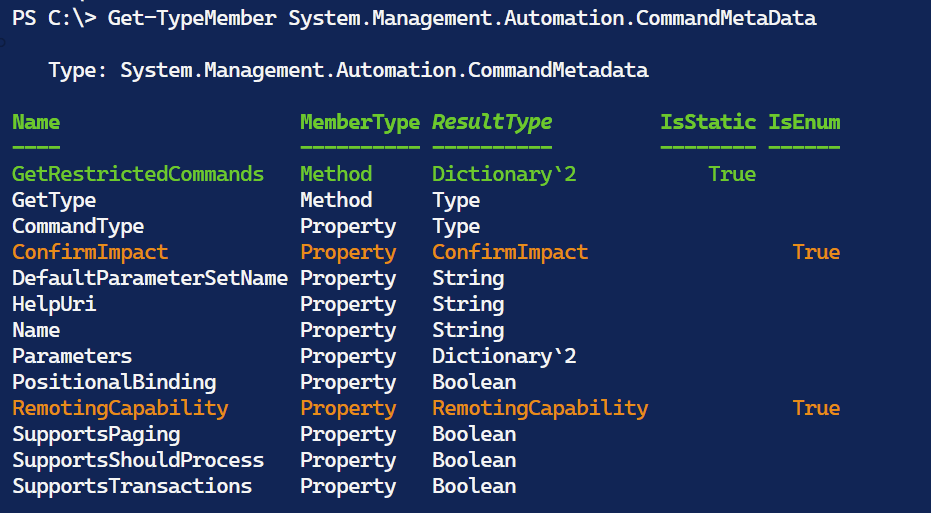
And how do I create one of these?
PS C:\> [System.Management.Automation.CommandMetaData]::New.OverloadDefinitions
System.Management.Automation.CommandMetadata new(type commandType)
System.Management.Automation.CommandMetadata new(System.Management.Automation.CommandInfo commandInfo)
System.Management.Automation.CommandMetadata new(System.Management.Automation.CommandInfo commandInfo, bool shouldGenerateCommonParameters)
System.Management.Automation.CommandMetadata new(string path)
System.Management.Automation.CommandMetadata new(System.Management.Automation.CommandMetadata other)
Getting Command Info
To create a CommandInfo object, you can use the Get-Command cmdlet.
$cmd = Get-Command Get-Service
I can verify this is the right object by checking the hierarchy of type names.
PS C:\> $cmd.PSObject.TypeNames
System.Management.Automation.CmdletInfo
System.Management.Automation.CommandInfo
System.Object
Get-Member will show me a type of CmdletInfo, but this is inherited from CommandInfo which will still recognized as an object type.
Getting Command Metadata
This means I can use $cmd to create a CommandMetadata object.
$meta = [System.Management.Automation.CommandMetadata]::New($cmd)
This is very useful information.
PS C:\> $meta

Name                    : Get-Service
CommandType             : Microsoft.PowerShell.Commands.GetServiceCommand
DefaultParameterSetName : Default
SupportsShouldProcess   : False
SupportsPaging          : False
PositionalBinding       : True
SupportsTransactions    : False
HelpUri                 : https://go.microsoft.com/fwlink/?LinkID=2096496
RemotingCapability      : SupportedByCommand
ConfirmImpact           : None
Parameters              : {[Name, System.Management.Automation.ParameterMetadata], [DependentServices,
                          System.Management.Automation.ParameterMetadata], [RequiredServices,
                          System.Management.Automation.ParameterMetadata], [DisplayName,
                          System.Management.Automation.ParameterMetadata]…}
PS C:\> $meta.PSObject.TypeNames
System.Management.Automation.CommandMetadata
System.Object


