
Formatting the Win32_Process Object
In this issue:
Let's wring a little more learning from my solution to July's scripting challenge. We've been exploring ways to script a replacement command for Get-Process that uses Get-CimInstance to query the Win32_Process class on remote computers. When we left last time we had extended the type to include alias properties that mapped to the alias properties we see from Get-Process.
In the last newsletter I exported the definitions to a types.ps1xml file and imported that when loading the function.
if (Test-Path $PSScriptRoot\cimProcess.types.ps1xml) {
    Update-TypeData -AppendPath $PSScriptRoot\cimProcess.types.ps1xml
}
The alias definitions make it easier to re-use property names with the new command.
PS C:\> $a = (Get-Process -id $pid | Get-Member -MemberType AliasProperty).Name
PS C:\> $a+="CPU"  #add a script property
PS C:\> Get-Process -id $pid | Select-Object $a | Format-Table

Handles Name    NPM        PM SI            VM        WS   CPU
------- ----    ---        -- --            --        --   ---
   1173 pwsh 128312 123588608  1 2341793144832 187727872 46.44

PS C:\> Get-Win32Process -id $pid | Select-Object $a | Format-Table

Handles Name        NPM     PM SI            VM        WS   CPU
------- ----        ---     -- --            --        --   ---
   1221 pwsh.exe 131072 122388  1 2341796704256 190013440 46.72
There is a slight difference in some values based on how they are calculated.
I don't think it is a productive use of time to either create aliases for all System.Diagnostics.Process properties, nor to create a custom object using these property names for Win32_Process property values. We have to accept that the new command writes a different object to the pipeline. I bothered with aliases and script properties because those are most likely to be familiar to, and used by, the user.
Getting Format Data
However, I'd still like the output from Get-Win32Process to be similar to Get-Process. Let me demonstrate and interesting way to re-invent the wheel.
You can view the formatting definitions of any object that has a defined format using Get-FormatData.
PS C:\> $f = Get-FormatData -TypeName System.Diagnostics.Process
This gives you a rich object that exposes the formatting.
PS C:\> $f

TypeNames                    FormatViewDefinition
---------                    --------------------
{System.Diagnostics.Process} {process, Priority, StartTime, process…}

PS C:\> $f.FormatViewDefinition

Name      Control
----      -------
process   System.Management.Automation.TableControl
Priority  System.Management.Automation.TableControl
StartTime System.Management.Automation.TableControl
process   System.Management.Automation.WideControl
process   System.Management.Automation.TableControl
process   System.Management.Automation.WideControl
All formatting directives are exposed.
PS C:\> $f.FormatViewDefinition[0].Control

Headers          : {System.Management.Automation.TableControlColumnHeader,
                   System.Management.Automation.TableControlColumnHeader,
                   System.Management.Automation.TableControlColumnHeader,
                   System.Management.Automation.TableControlColumnHeader…}
Rows             : {System.Management.Automation.TableControlRow}
AutoSize         : False
HideTableHeaders : False
GroupBy          :
OutOfBand        : False

PS C:\> $f.FormatViewDefinition[0].Control.Headers

Label  Alignment Width
-----  --------- -----
NPM(K)     Right     7
PM(M)      Right     8
WS(M)      Right    10
CPU(s)     Right    10
           Right     7
           Right     3
       Undefined     0

PS C:\> $f.FormatViewDefinition[0].Control.Rows.Columns

Alignment DisplayEntry                             FormatString
--------- ------------                             ------------
Undefined script: [long]($_.NPM / 1024)
Undefined script: "{0:N2}" -f [float]($_.PM / 1MB)
Undefined script: "{0:N2}" -f [float]($_.WS / 1MB)
Undefined script: "{0:N2}" -f [float]($_.CPU)
Undefined property: Id
Undefined property: SI
Undefined property: ProcessName
In Windows PowerShell, common types were defined in ps1xml files found in $HOME. You could load the file in an editor, find the type you were interested in, and then copy and paste into a new format file. In PowerShell 7, this data is now part of compiled code for better performance. There are no external ps1xml files. Although you can still create your own and load them into PowerShell.
Exporting Format Data
Instead of trying to parse the output from Get-FormatData and create an XML file, you can simply export it!
$f | Export-FormatData -Path d:\temp\process.format.ps1xml -IncludeScriptBlock -Force
For the sake of demonstration, I only want to keep the default table view. With a little XML voodoo I can load the file, delete the unwanted nodes and save the file.
[xml]$fd = Get-Content D:\temp\process.format.ps1xml
$views = $fd.SelectNodes('/Configuration/ViewDefinitions/View')
$views | Select-Object -Skip 1 | ForEach-Object {
    $_.ParentNode.RemoveChild($_)
}
$fd.Save('d:\temp\process.format.ps1xml')
Because the output from my function has property definitions for the properties used in the formatting file, all I need to do is change the type name.
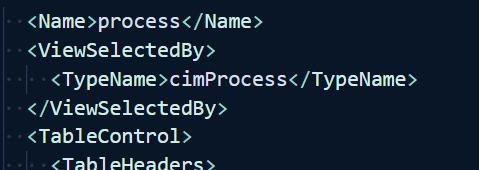
I can now load the formatting file into my PowerShell session.
Update-FormatData D:\temp\process.format.ps1xml


