
Easy Enum Expertise
In this issue:
For today's lesson, I thought we'd explore something you probably use every day in PowerShell, but I doubt you've ever thought about the details, and that is an enumeration. More commonly known as an enum. This is a special .NET class, [System.Enum], that is used throughout PowerShell. I think if you have a better understanding of this class it might help with troubleshooting code. It is also something you can incorporate into your work.
What is an Enum?
In short, an enum is a list of pre-defined and static values. Once defined, the enum values cannot be changed. This ensures that when you use the enum class, the values will be known and predictable. There are two parts to this concept. First, there is the base .NET class which I can discover using the familiar Get-TypeMember command from PSScriptTools.
PS C:\> Get-TypeMember System.Enum

   Type: System.Enum

Name                      MemberType ResultType IsStatic IsEnum
----                      ---------- ---------- -------- ------
Format                    Method     String         True
GetName                   Method     String         True
GetNames                  Method     String[]       True
GetType                   Method     Type
GetUnderlyingType         Method     Type           True
GetValues                 Method     TEnum[]        True
GetValues                 Method     Array          True
GetValuesAsUnderlyingType Method     Array          True
HasFlag                   Method     Boolean
IsDefined                 Method     Boolean        True
Parse                     Method     Object         True
Parse                     Method     TEnum          True
ToObject                  Method     Object         True
ToString                  Method     String
TryFormat                 Method     Boolean        True
TryParse                  Method     Boolean        True
We can use this class to pick apart the other half of the story, and that is a defined enum. Here is one that I know you are familiar with, although you may not have known it was an enum.
PS C:\> Get-TypeMember System.ConsoleColor

   Type: System.ConsoleColor

Name        MemberType ResultType          IsStatic IsEnum
----        ---------- ----------          -------- ------
Black       Field      System.ConsoleColor     True
Blue        Field      System.ConsoleColor     True
Cyan        Field      System.ConsoleColor     True
DarkBlue    Field      System.ConsoleColor     True
DarkCyan    Field      System.ConsoleColor     True
DarkGray    Field      System.ConsoleColor     True
DarkGreen   Field      System.ConsoleColor     True
DarkMagenta Field      System.ConsoleColor     True
DarkRed     Field      System.ConsoleColor     True
DarkYellow  Field      System.ConsoleColor     True
Gray        Field      System.ConsoleColor     True
Green       Field      System.ConsoleColor     True
Magenta     Field      System.ConsoleColor     True
Red         Field      System.ConsoleColor     True
White       Field      System.ConsoleColor     True
Yellow      Field      System.ConsoleColor     True
GetType     Method     Type
HasFlag     Method     Boolean
ToString    Method     String
The fields reflect the defined members of the enum.
> The IsEnum property is used to show if a class property is an enum. You'll see that later.
One way to test if a class is an enum is by checking the isEnum property.
PS C:\> [ConsoleColor].IsEnum
True
Enum Names
When it comes to identifying the names in the enum, we have a few options, beyond using Get-TypeMember. You can use PSReadline. Start typing the class name followed by :: and then Ctrl+Space.
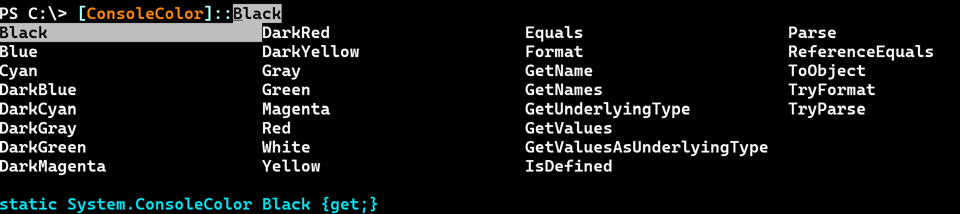
Or just press Tab after the ::.
You can use the [Enum] class.
PS C:\> [Enum]::GetNames([ConsoleColor])
Black
DarkBlue
DarkGreen
DarkCyan
DarkRed
DarkMagenta
DarkYellow
Gray
DarkGray
Blue
Green
Cyan
Red
Magenta
Yellow
White
Any enum class inherits this method, so you could also do this:
PS C:\> [ConsoleColor]::GetNames([ConsoleColor])
Black
DarkBlue
DarkGreen
DarkCyan
DarkRed
DarkMagenta
DarkYellow
Gray
DarkGray
Blue
Green
Cyan
Red
Magenta
Yellow
White


