
Another Script Tagging Technique
In this issue:
In previous newsletters we've explored ways to tag or label script files. As much as I enjoy using alternate data streams, data can be lost when moving files across drives. Recently, while updating the PSScriptTools module, I tried something new to tag things. Instead of tagging a file, I wanted to tag the function. The module includes commands which can be categorized. In the project's README file, I document commands based on a category or description. I realized these could be tags.
The end result was an updated PSScriptTools object.
PS C:\> Get-PSScriptTools -Verb add | Select Name,Tags
___ ___ ___         _      _  _____        _
| _ \ __/ __|__ _ _(_)_ __| |__   _|__ ___| |___
|  _\__ \__ \ _| '_| | '_ \  _|| |/ _ \ _ \ (_-<
|_| |___/___\__|_| |_|_.__/\__||_|\___\___/_/__/
|_|                  |_|
v3.2.0

Name       Tags
----       ----
Add-Border {console, ansi}
I was even able to create a new table view.
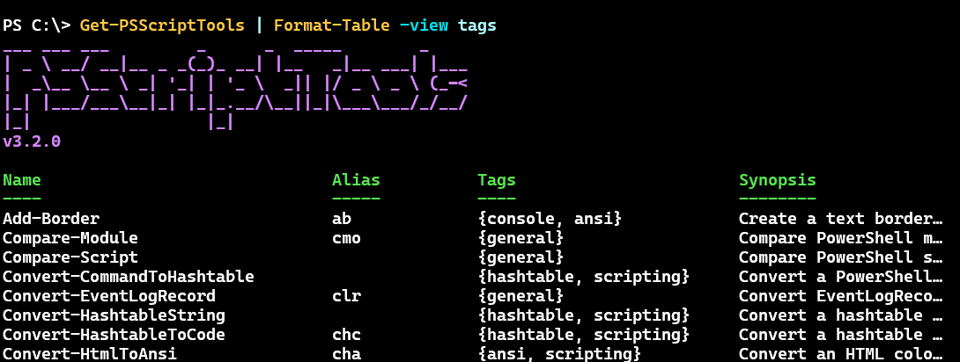
I even updated Get-PSScriptTools to filter by tag.
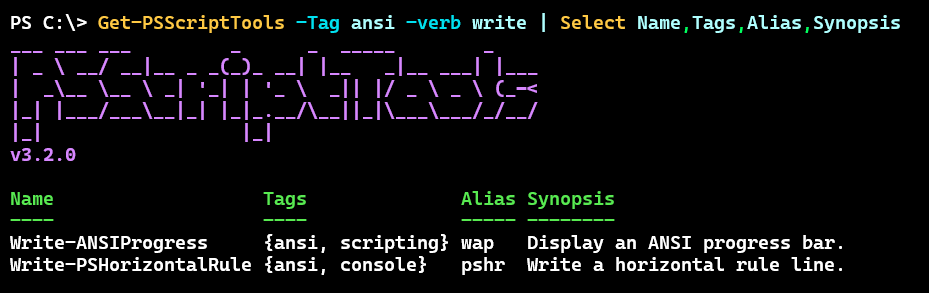
I thought I would spend a little time showing you how I made this work.
Parsing with the AST
The secret ingredient is PowerShell's Abstract Syntax Tree, commonly referred to as the AST. I've written about this in the past but let's do a quick review.
This is a .NET class that will require a little scripting to work with. You begin with initializing two variables.
New-Variable astTokens -Force
New-Variable astErr -Force
The first variable will eventually contain code tokens. The other variable will contain any parsing errors. You can use the AST to parse a file or a script block. For my purposes, I wanted to parse the code inside a function. Here's a sample.
function Get-FooDemo {
    [cmdletbinding()]
    param(
        [string]$Name = 'PowerShell'
    )
    begin {
        #cmdTags = demo,foo  <--my target
        Write-Verbose "[$((Get-Date).TimeOfDay) BEGIN  ] Starting $($MyInvocation.MyCommand)"
    } #begin
    process {
        Write-Verbose "[$((Get-Date).TimeOfDay) PROCESS] Processing"
        $r = $name.ToUpper()
        #write ANSI formatted output
        '{0}{1}{2}' -f $PSStyle.Foreground.BrightGreen, $r, $PSStyle.Reset
    } #process
    end {
        Write-Verbose "[$((Get-Date).TimeOfDay) END    ] Ending $($MyInvocation.MyCommand)"
    } #end
}
You can see that I have inserted a comment called #cmdTags The comment technically can exist anywhere inside the function definition. I decided to place it at the beginning of code, generally the first line of the Begin block. This felt more comfortable to me but it isn't a requirement. The comment just needs to between function and the closing curly brace. As I work with this more I might change my mind for now I'll use the Begin block.
ParseInput()
The AST Parser has a method called ParseInput.
PS C:\> [System.Management.Automation.Language.Parser]::ParseInput.OverloadDefinitions
static System.Management.Automation.Language.ScriptBlockAst ParseInput(string input, [ref] System.Management.Automation.Language.Token[] tokens, [ref] System.Management.Automation.Language.ParseError[] errors)
static System.Management.Automation.Language.ScriptBlockAst ParseInput(string input, string fileName, [ref] System.Management.Automation.Language.Token[] tokens, [ref] System.Management.Automation.Language.ParseError[] errors)
I want to parse a script block because I can get that from a loaded function using the Function: PSDrive.
$sb = (Get-Item Function:\Get-FooDemo).ScriptBlock
The script block is everything inside the function definition.
PS C:\> $sb

    [cmdletbinding()]
    param(
        [string]$Name = 'PowerShell'
    )
    begin {
        #cmdTags = demo,foo
        Write-Verbose "[$((Get-Date).TimeOfDay) BEGIN  ] Starting $($MyInvocation.MyCommand)"
    } #begin
    process {
        Write-Verbose "[$((Get-Date).TimeOfDay) PROCESS] Processing"
        $r = $name.ToUpper()
        #write ANSI formatted output
        '{0}{1}{2}' -f $PSStyle.Foreground.BrightGreen, $r, $PSStyle.Reset
    } #process
    end {
        Write-Verbose "[$((Get-Date).TimeOfDay) END    ] Ending $($MyInvocation.MyCommand)"
    } #end
I can use this, along with the [ref] variables to parse the script block.
PS C:\> $ast = [System.Management.Automation.Language.Parser]::ParseInput($sb, [ref]$astTokens, [ref]$astErr)
The method will return all the AST information, but I don't need it. What I want is in $astTokens.


