
[ActionsDotWork] BarCuts - A Surprisingly Useful macOS Shortcuts Launcher
Hello, Productivity Friends!
My name is Carlo and I'm the author of several Shortcuts-related macOS & iOS apps, such as Actions for Obsidian and Browser Actions for macOS. You're receiving this email because you signed up for updates about the ActionsDotWork apps on my website some time ago.
-
TL;DR: Say Hello to my new macOS app BarCuts, a contextual menu bar launcher for macOS Shortcuts workflows.
-
You might be aware that I like Shortcuts, Apple’s macOS/iOS automation system. On paper, it’s solid, in practice it has some rough edges. One of those has always been able to drive me up a wall if I accidentally enabled it:
The macOS Shortcuts menu bar. It’s only borderline usable and hard to enjoy. It shows all the workflows you’ve enabled “Pin in Menu Bar” for, true, but it shows all of them, all the time, in a seemingly random order. And it looks like a cropped iPhone screenshot that someone taped to my MacBook. It’s very much the opposite of a “Mac-assed” Mac app.
So I set out to build an app that replaces that thing, and today, I’m happy to release BarCuts.
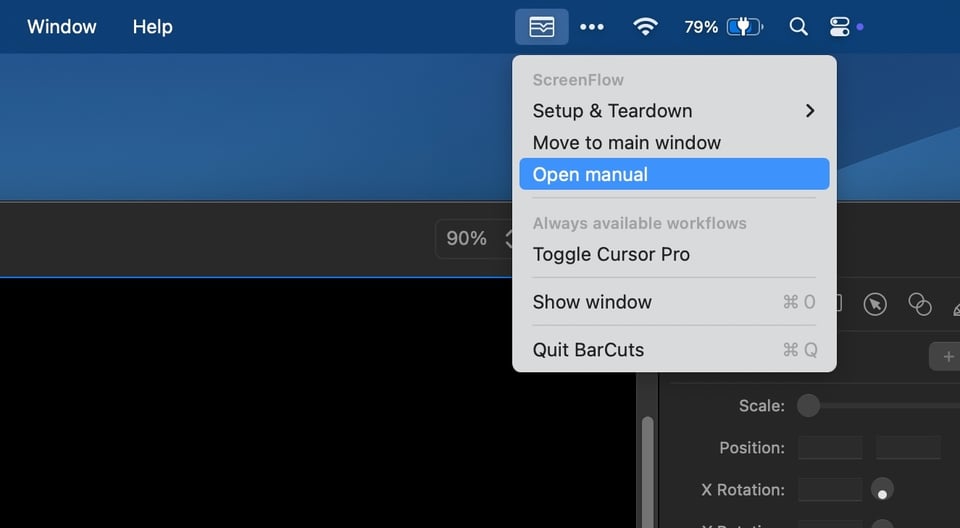
It’s a macOS menu bar app that surfaces your relevant Shortcuts workflows when you need them. You "tag" workflows to an application, and when that app is in front, BarCuts will show its tagged workflows in a menu, ready for you to use.
Real-life example: Here’s a screenshot of my BarCuts menu where the ScreenFlow app is in the front. It shows only those workflows I marked as relevant to ScreenFlow.
I call it a “surprisingly useful macOS Shortcuts launcher” because, to be honest, I was surprised how much more I use Shortcuts since I wrote it.
It’s smart/contextual, it has keyboard support, it’s lean, and it aims to deserve the space in your menu bar, through functionality and looks.
You’ll find more details on BarCuts’ product page. I’d be delighted if you would give it a go! I think you’ll like it. 🤞🏼
-
-
And that’s it for today. Thanks for reading!
If you have questions or ideas for actions or tutorial videos, or have written or recorded something about my apps, please email me, say Hi on Mastodon or Bluesky, or post on the ActionsDotWork Forum! I'm always happy to chat with customers! 🤙🏼
Thanks again for your interest in my work, it means a lot to me 🙏🏼
Talk to you soon,
– Carlo

