
Your Second Brain: How To Project Manage Your Day-to-Day
The concept of "project managing your life" might sound daunting, but at its core, it's about applying the same principles used in business to your personal goals and daily routines.
It's about taking a proactive, organized approach to everything from your career aspirations to your weekend plans. And when it comes to a single tool to help you do this, a tool like Notion, Click Up or Monday is a powerful and flexible choice. The versatility of these tools allow you to build a personal productivity system that is uniquely tailored to your needs, transforming chaos into clarity.
One of the first steps is to centralize your entire life in one place. Instead of scattered notes, to-do lists on sticky pads, and separate digital calendars, Notion provides a singular hub. Start with a master task database. This is the cornerstone of your system. Every single thing you need to do—whether it’s a work assignment, grocery shopping, or scheduling a dentist appointment—gets logged here. Use properties to tag each item: is it a "work" task, a "personal" errand, or a "learning" objective? Assign a priority level and a due date. This simple act of writing everything down frees up mental bandwidth, so you're no longer trying to remember everything.
Once you have your tasks centralized, you can create different "views" to see your life from various angles. A calendar view can show you all your deadlines and appointments, giving you a clear picture of your week. A Kanban board is perfect for visualizing your workflow, with columns like "To Do," "In Progress," and "Done." This is particularly useful for managing multi-step projects, whether it's a home renovation or a large work presentation. A simple list view can act as your daily to-do list, filtered to only show the tasks you need to focus on today.
Beyond simple tasks, these tools can work as a "Second Brain" or a personal wiki where you can store all the information you want to reference later. This could be anything from a list of books you want to read, notes from a webinar, or a repository of important documents and links. When you stumble upon a useful article, a new recipe, or an inspiring quote, just drop it into your Notion knowledge base (using Notion as an example, not necessarily a recommendation). This habit ensures that valuable information isn't lost in a sea of browser tabs and bookmarks.
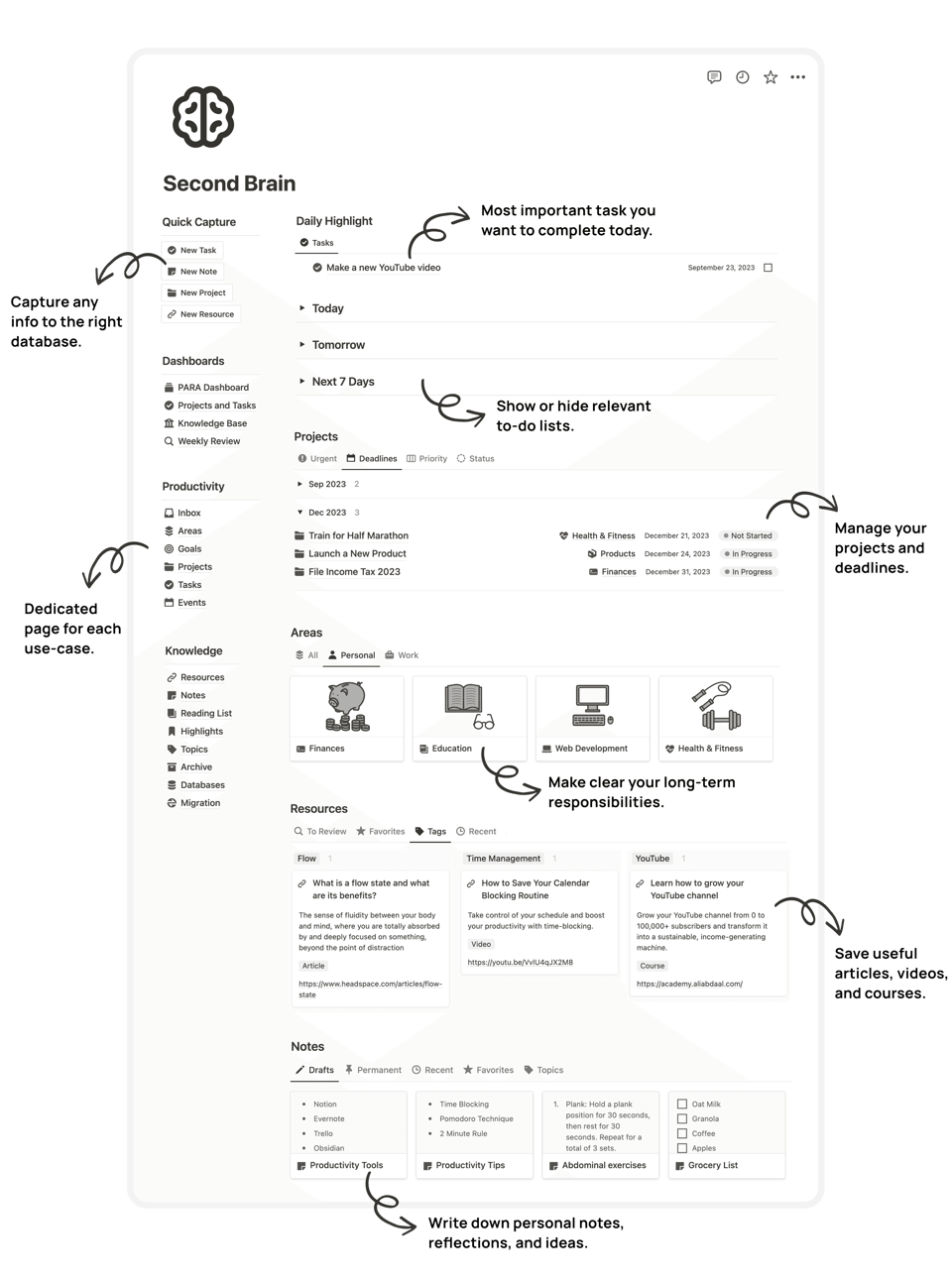
Finally, use Notion or one of those other tools to track your personal goals and habits. Break down big, hairy goals—like "learn a new language" or "run a marathon"—into smaller, manageable projects. Create a page for the goal, and list the sub-tasks required to achieve it. You can even create a simple habit tracker with a series of checkboxes to monitor daily activities like exercise, meditation, or reading. By combining task management, knowledge organization, and goal tracking into a single, interconnected system, Notion empowers you to be the project manager of your own life, moving you from simply reacting to life to proactively building the life you want.
This Week's Links of Note
Supercharge Your Social Media with AI. Managing a social presence? Adobe's new guide, "How to Maximize Social Content with AI in 2025," is a good read with practical, step-by-step advice on how to use generative AI to create a cohesive brand identity, generate content variations, and resize images and videos in a flash.
Need a Boost? This MIT guide for business leaders navigating the complexities of hybrid work. It provides concrete tips, such as measuring success based on outcomes rather than hours worked, and allowing individual teams to determine their in-person schedules. This is a highly practical resource for managers and business owners who want to optimize their hybrid or remote work environments for maximum productivity and employee satisfaction."7 Essential Hybrid Work Tips for Leaders in 2025"
Source: MIT Sloan Management Review
LINK: https://sloanreview.mit.edu/article/seven-essential-hybrid-work-tips-for-leaders-in-2025/
McKinsey’s AI Overview. This report from the U.S> based global management company from earlier this year a good over view of how AI is not just automating tasks but "amplifying human agency" and creativity in the workplace. It discusses how leaders can responsibly deploy AI to empower their employees, and how AI's enhanced reasoning capabilities are enabling a new level of problem-solving. This is a good overview if you haven’t read it yet, and can you think about the strategic, rather than just tactical, implementation of AI.
That’s all for this week. We hope these insights offer some practical ways to put technology to work for you - and that’s the focus of this newsletter.
If you know a colleague or friend who could benefit from these tips, please forward this newsletter to them. We also welcome your feedback. Simply reply to this email with your thoughts or to suggest a topic for our next edition.
Thank you for reading.
See you in the future,
THE DEPT OF NEXT